Settings
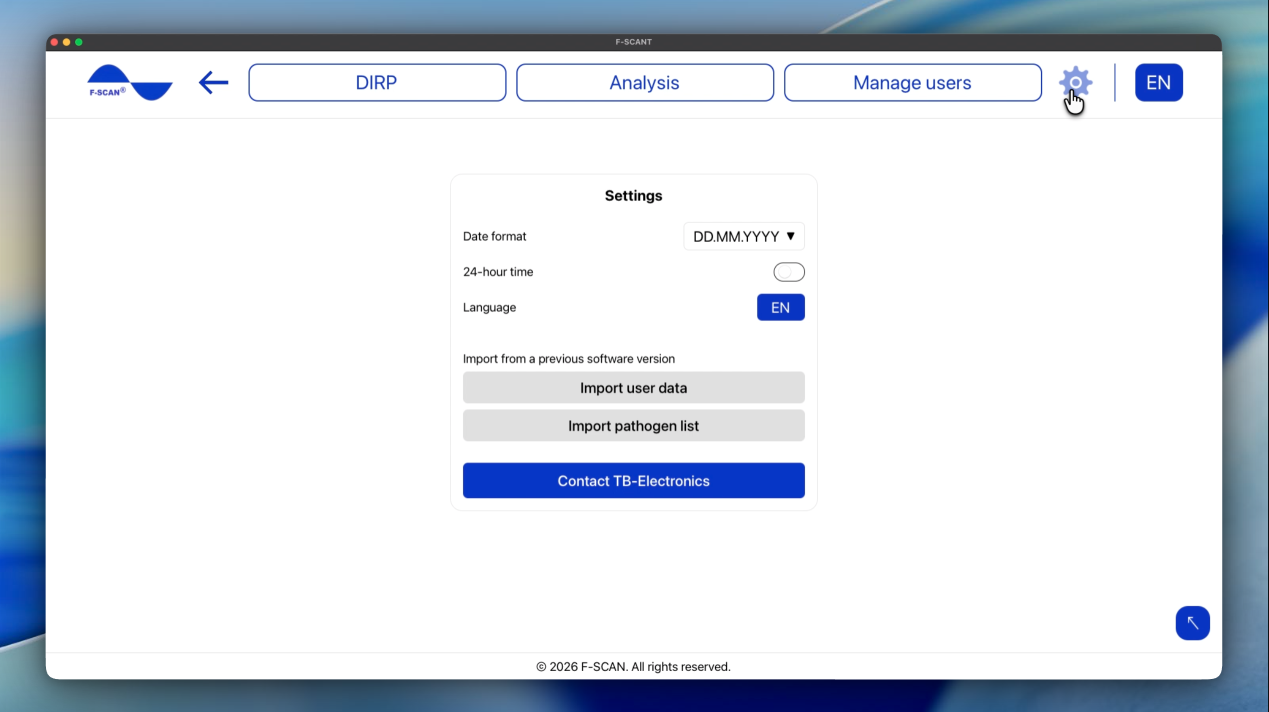
Click the gear in the top menu to open Settings.
Figure 10. Settings: date format, 24-hour time, language, and import.
How to set date and time
- Date format: sets the order in which dates are shown. Choose DD.MM.YYYY (day first, e.g. 25.10.2026), MM.DD.YYYY (month first, e.g. 10.25.2026), or YYYY.MM.DD (year first, e.g. 2026.10.25).
- 24-hour time: when on, times appear as 14:30. When off, they appear as 2:30 PM.
These settings only change how dates and times look in F-SCANT. They do not change the F-SCAN.
How to set the language
Language in Settings, or the language letters in the top bar, change the language of F-SCANT.
The menu shows EN, IT, DE, PL, CZ (English, Italian, German, Polish, Czech).
Words such as DIRP, Hz, Fmin, Fmax, HITS and CLIP stay as they are in every language. People’s names and the pathogen list are also not translated.
How to import from a previous software version
Under Import from a previous software version you can bring in data from older F-SCANT software:
- Import user data
- Import pathogen list
For each one, click Choose file and pick the export from the old software, or paste the text of that export where the screen asks for it. The screen mentions a JSON array; that is simply the file format of the old export.
Please note: import adds or replaces data on this computer, depending on the file. Check that you have the right file before you continue. This does not change what is stored on the F-SCAN until you transfer something.
Contact TB-Electronics
Contact TB-Electronics opens an email to info@fscan.com.